/
Updating Pulsar for Field Service (SFS)
Updating Pulsar for Field Service (SFS)
- Carla Locke
Owned by Carla Locke
Mar 15, 2023
Analytics
Loading data...
Perform these steps when you need to update Pulsar for Field Service due to new releases.
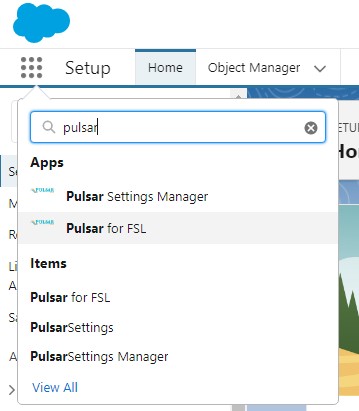
- Click on AppLauncher and find Pulsar for FSL app
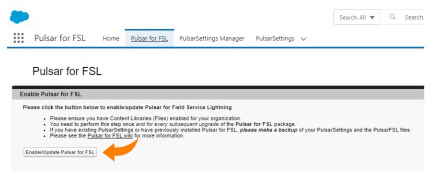
- Click on the Pulsar for SFS tab
.png?version=1&modificationDate=1678907157171&cacheVersion=1&api=v2)
- Click on Enable/Update Pulsar for SFS.
- When you go to Pulsar, be sure to Refresh Settings and Sync Now.
, multiple selections available,
Related content
Configuring Pulsar to run Salesforce Field Service (SFS)
Configuring Pulsar to run Salesforce Field Service (SFS)
More like this
Error: No assigned service resource found for this user
Error: No assigned service resource found for this user
More like this
Upgrading from Pulsar 11 to Pulsar 12
Upgrading from Pulsar 11 to Pulsar 12
More like this
Salesforce Field Service API
Salesforce Field Service API
More like this
How do I Display Field Service Report Templates in Pulsar?
How do I Display Field Service Report Templates in Pulsar?
More like this
Why are my settings changes not reflected in Pulsar?
Why are my settings changes not reflected in Pulsar?
More like this